

Will man mehrere Hosts mit ipv4 oder/und ipv6 anpingen und das in einer guten Übersicht? Das geht mit noping. Wenn es nicht schon installiert ist, gehte es mit sudo apg-get install oping.
Die noping C Library generirt ICMP echo requests um zu sehen was so im Netzwerk läuft.
Dann ein Aufruf z.B. mit drei Zielen:
noping wenzlaff.de wenzlaff.info kleinhirn.eu liefert grüne Balken mit dem Ergebnis:
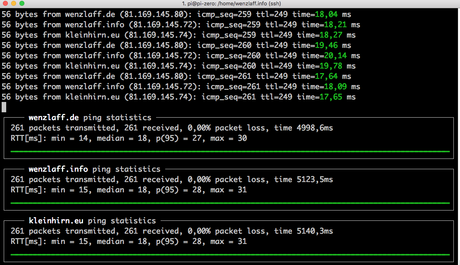
Das Programm kann mit Ctrl-C beendet werden und gibt dann ein Ergebnis zurück:
--- wenzlaff.de ping statistics ---
268 packets transmitted, 268 received, 0,00% packet loss, time 5137,5ms
RTT[ms]: min = 14, median = 18, p(95) = 27, max = 30

--- wenzlaff.info ping statistics ---
268 packets transmitted, 268 received, 0,00% packet loss, time 5264,1ms
RTT[ms]: min = 15, median = 18, p(95) = 28, max = 31

--- kleinhirn.eu ping statistics ---
268 packets transmitted, 268 received, 0,00% packet loss, time 5279,7ms
RTT[ms]: min = 15, median = 18, p(95) = 28, max = 31
Alle Befehle gibt es mit
noping
Usage: noping [OPTIONS] -f filename | host [host [host ...]]

Available options:
  -4|-6        force the use of IPv4 or IPv6
  -c count     number of ICMP packets to send
  -i interval  interval with which to send ICMP packets
  -w timeout   time to wait for replies, in seconds
  -t ttl       time to live for each ICMP packet
  -Q qos       Quality of Service (QoS) of outgoing packets
               Use "-Q help" for a list of valid options.
  -I srcaddr   source address
  -D device    outgoing interface name
  -m mark      mark to set on outgoing packets
  -f filename  read hosts from <filename>
  -O filename  write RTT measurements to <filename>
  -u / -U      force / disable UTF-8 output
  -g graph     graph type to draw
  -P percent   Report the n'th percentile of latency
  -Z percent   Exit with non-zero exit status if more than this percentage of
               probes timed out. (default: never)

oping 1.9.0, http://noping.cc/
by Florian octo Forster <[email protected]>
Den C-Code gibt es auf GitHub (https://github.com/octo/liboping/).
Ähnliche Artikel:
- Jenkins Pipeline optimieren mit parallele Ausführung auf dem Raspberry Pi
- Überwachung: Automatischer Ping an Server mit NodeRED auf Raspberry Pi (مراقبة)
- Raspberry Pi: Sniffen mit TShark, aber nicht als root User